

In 2025, businesses are increasingly relying on Azure migration services to accelerate their shift to the cloud for greater scalability and resilience.
By moving workloads, databases, and applications from on-premises systems to the Azure migration services, organizations gain agility, stronger security, and better cost efficiency.
Tools like Azure Migrate and the Data Migration Service (DMS) help businesses manage the process smoothly — from early assessment through final execution.
With rising demands for scalability, compliance, and disaster recovery, adopting a smart cloud adoption strategy is no longer optional—it’s a competitive necessity.
This guide explores the latest tools, trends, and best practices to help businesses succeed with Azure migration in 2025. The shift to cloud is not just a technical upgrade—it’s a step toward long-term digital resilience.
As market demands evolve, those leveraging Azure’s ecosystem will be better positioned to innovate, cut operational costs, and future-proof their business operations.
What Are Azure Migration Services?

Microsoft provides a suite of Azure migration services that support apps, databases, and virtual environments.
The central tool is Azure Migrate, which works alongside Azure Data Migration Service (DMS) and Database Migration Assistant (DMA).
They help assess whether your workloads are ready for the move and guide you through a smoother transition.
These services also include SQL Server Migration Assistant (SSMA) and Azure Synapse Pathway.
You can choose the right tool depending on whether you are doing a lift and shift migration, database migration, or bringing archived data online. This flexibility makes the migration process adaptable.
Businesses can also integrate these tools with Azure Backup and Azure Site Recovery for robust disaster recovery.
By combining automation with expert cloud migration consulting, companies can reduce downtime, optimize workloads, and improve long-term cloud performance.
What Are the Benefits of Azure Migration?
Migrating to Azure offers businesses clear advantages — including cost savings, faster performance, and stronger resilience.
Businesses reduce hardware spend and freeze less IT overhead. Azure’s built-in compliance helps with regulations like HIPAA, ensuring safe data handling in the cloud.
Cloud systems boost performance and scalability. You can spin up new Azure virtual machines (VMs) on demand.
With better global uptime and built-in backup via Azure Backup, your business can maintain seamless service and protect data from disruptions.
In addition, integration with Azure Site Recovery ensures rapid failover in case of outages.
By adopting Azure identity and access management, organizations strengthen security and maintain control over sensitive resources, even in complex hybrid cloud setups.
Key Capabilities and Types of Azure Migration Services
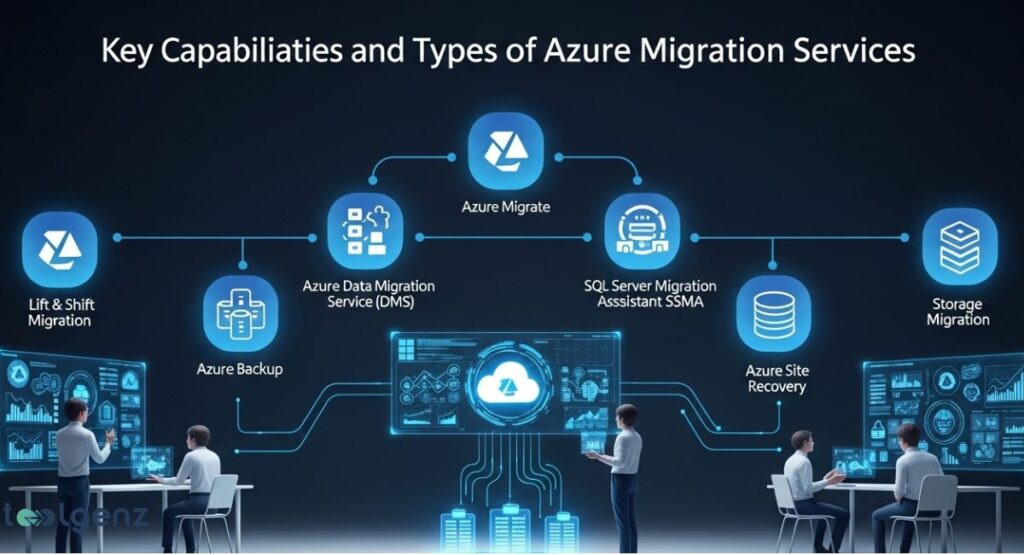
Azure supports Lift and shift migration, app modernization, and hybrid integration. It can handle everything from moving legacy systems to revamping applications for the cloud.
This approach helps organizations improve efficiency across different workloads and migration types.
Tools also include Azure Synapse Pathway for automated code translation and Cloud Volumes ONTAP for SnapMirror data replication.
These offerings streamline application migration and storage migration, especially for large data estates or enterprise environments.
In 2025, advanced Azure migration services security features and Azure modernization guidance further enhance reliability, ensuring that both data and applications meet compliance standards.
With optimized workflows and AI-powered recommendations, the transition to Azure becomes faster, smarter, and more cost-effective for businesses of all sizes.
When planning Azure migration services, businesses should also evaluate their broader IT ecosystem, and resources like the IT infrastructure 2025 ultimate guide to growth provide valuable insights on scaling effectively while ensuring security and compliance.
Azure Migration Trends and Latest Updates in 2025
In 2025, the most notable trends in Azure migration services include AI-powered assessment and zero-downtime execution.
Microsoft has added cost optimization tools integrated into Azure Migrate. These help businesses manage billing and efficiency upfront.
Updates also include retirement of old APIs and support for modern PaaS environments.
The platform now recommends using Azure resource groups, Azure virtual networks, and enhanced integration with Microsoft Defender for Cloud within migration planning.
Additionally, Azure migration services now offer predictive analytics to forecast resource needs, reducing unexpected costs.
Businesses also benefit from deeper automation in Azure migration execution, allowing faster deployments while maintaining strict compliance and security protocols.
How Does the Azure Migration Process Work?

The Azure migration process begins with assessment and planning using Azure Migrate. Then you run a proof of concept before full migration.
Once replication and cutover are complete, the environment is validated and fine-tuned for performance.
Monitoring tools and dashboards help ensure your systems operate smoothly. You implement security via Azure identity and access management and use Azure Security Center to guard your workloads post-migration.
In recent years, businesses have also incorporated proactive threat detection and automated policy enforcement into their post-migration workflows.
Regular performance reviews, scalability tests, and resource optimization cycles are now considered essential to maximize the long-term value of an Azure migration investment.
Top Azure Migration Tools and Solutions
Key tools include Azure Migrate, Azure Data Migration Service (DMS), SQL Server Migration Assistant (SSMA), Azure Backup, and Azure Site Recovery. These tools cover servers, databases, backup, and disaster recovery needs.
Using third-party tools such as Cloud Volumes ONTAP enhances your ability to scale storage and manage cross-cloud replication. A comparison table below helps evaluate best use cases for U.S. businesses.
Additionally, many organizations now combine native and third-party tools to create hybrid migration frameworks, allowing more customization and faster execution.
By adding automation and orchestration, businesses can cut down manual steps and make complex migrations more predictable.
| Tool | Use Case |
| Azure Migrate | Assessment and server migration |
| DMS / DMA / SSMA | Database and application migration |
| Azure Backup / Site Recovery | Backup and disaster recovery |
| Cloud Volumes ONTAP | Storage replication and efficiency |
Pricing and Cost Considerations for Azure Migration

Microsoft offers free trials for services like Azure Migrate and DMS before businesses commit to ongoing costs.
Azure migration services pricing varies depending on workload size, chosen tools, and optimization strategies.
Migration planning should include cost forecasting. Using the Azure pricing calculator helps estimate expenses.
Also align migration strategy with reserved instance savings and compliance overheads that vary by industry.
In 2025, businesses are also leveraging AI-powered cost analysis within Azure to predict long-term savings and avoid budget overruns.
Factoring in training costs for IT teams and potential downtime during migration ensures a more accurate financial plan and smoother project execution.
To accurately estimate the total cost of Azure migration services, businesses can use the Microsoft Azure Pricing Calculator, which helps forecast resource consumption, optimize workloads, and align budget expectations with long-term business goals.
Configuring Azure Migration Services for Optimal Results
Start with Azure migration assessment to map dependencies and size workloads. Define a clear business goal and align team skills. Use Azure modernization guidance to avoid pitfalls and streamline the migration.
Next secure your environment using Azure identity and access management. Monitor progress via Microsoft Defender for Cloud and Azure Security Center.
After migration, optimizing workloads helps improve performance while keeping long-term costs under control.
Additionally, adopting automated monitoring alerts, continuous security audits, and periodic workload reviews ensures the migrated environment remains compliant, resilient, and cost-efficient well into the future.
FAQs
1. What is an Azure migration?
Azure migration is the process of moving applications, data, and workloads from on-premises or other cloud platforms to Microsoft Azure.
2. What is Azure AD migration?
Azure AD migration involves moving identity and access management from on-premises Active Directory to Azure Active Directory for cloud-based authentication and services.
3. What are the 7R migration strategies for Azure?
The 7Rs are Rehost, Refactor, Rearchitect, Rebuild, Replace, Retire, and Retain—strategies for moving workloads to Azure.
4. Does Azure Migrate cost money?
Azure Migrate is free, but you pay for the Azure resources and services you use after migration.
5. How many types of migration are there in Azure?
Azure supports application, database, server, storage, and virtual desktop migrations.