

Apple has finally released Apple’s Journal app for iPhone, giving users a seamless way to capture their thoughts, memories, and daily experiences. Designed for iOS 17.2, this journaling app emphasizes simplicity, privacy, and ease of use, making it ideal for both beginners and casual journalers.
You can create entries with photos, audio clips, and location tags, all within a clean, clutter-free interface. With built-in suggestions and a timeline view to organize posts by date, Apple is redefining how iPhone users reflect and record their daily lives. Customizable notifications and secure local storage further enhance the experience, making digital journaling private and effortless.
Introduction to Apples Journal App
Apple’s Journal app for iPhone is a modern way to track thoughts, daily reflections, and meaningful memories. Designed for iOS 17.2, the app takes full advantage of Apple’s ecosystem, blending simplicity with powerful functionality. It encourages regular journaling by offering easy-to-follow prompts and notifications to keep you engaged. Unlike many third-party apps, Apple prioritizes privacy and local storage, so your entries remain safely on your device unless you choose to sync them.
The interface is intuitive and uncluttered, presenting entries in a timeline view while allowing photos, audio snippets, and location tagging. This makes it easy to relive experiences visually and audibly. With Apple’s Journal app for iPhone, even beginners can start writing without feeling overwhelmed by options or menus.
First Impressions and Launch Experience

Opening Apple’s Journal app for iPhone for the first time showcases Apple’s attention to detail. The onboarding process guides you through enabling notifications, setting up privacy features, and understanding how suggestions work. You can lock the app when not in use, giving you confidence that your thoughts stay private and secure.
Once inside, the interface is minimal yet inviting. Your first post encourages action, prompting you to tap the “+” button to start journaling. The magic wand feature offers creative inspiration, and a simple refresh button provides new ideas whenever needed. Media embedding photos, audio clips, and maps turns simple notes into rich digital memories. You can also tailor notifications to remind you to write each day, helping establish a consistent journaling habit.
Core Features and Functionality
Apple’s Journal app for iPhone focuses on combining simplicity with flexibility. Users can start from scratch or select suggested prompts. Every entry can include photos, audio, and location tags, and important posts can be bookmarked for quick reference. The timeline view organizes entries by date, with filters for media or mood-based sorting.
Editing is straightforward—you can adjust entry dates, update content, or revisit prompts when inspiration is needed. Sorting and filtering options make it easy to focus on specific entries. For instance, you can view just the posts with photos, audio, or locations, making it simple to recall particular moments.
Here’s a quick summary of key features:
| Feature | Function | Benefit |
|---|---|---|
| Timeline view entries | Displays posts by date | Easy way to track memories |
| Media embedding | Add photos, audio, maps | Enhances the journaling experience |
| Magic wand prompt | Suggests ideas | Helps overcome writer’s block |
| Journal app notifications | Reminds you to write | Builds a daily habit |
| Privacy and local storage | Keeps entries on device | Protects sensitive information |
How It Compares to Third-Party Apps
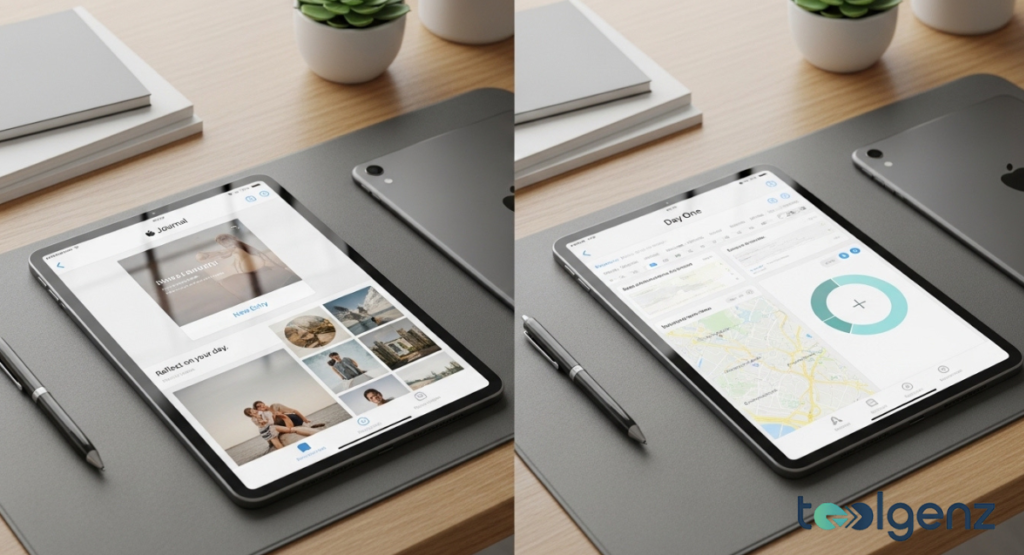
Compared to other iPhone journaling apps, Apple’s Journal app for iPhone is simpler and more privacy-focused. While apps like Day One or Journey include cloud syncing, social features, and advanced AI prompts, Apple emphasizes local storage and secure, private entry creation.
Some users may miss features like in-depth search functions or integration with health apps, but the app offers a clean, distraction-free experience. Its minimalistic design and thoughtful suggestions make it perfect for casual users who prefer simplicity. For privacy-conscious users, this app provides a secure way to journal without the complexity of more advanced alternatives.
Potential Smart Features and Improvements
Apple has plenty of room to expand Apple’s Journal app for iPhone. One exciting possibility is AI-driven suggestions based on your journaling habits, highlighting recurring themes or important moments automatically. Future updates could also integrate with the Health or Fitness apps, offering prompts related to activity, mood, or daily routines.
Other potential enhancements include richer media options such as video or voice-to-text transcription. Syncing across multiple devices while maintaining local storage encryption could further elevate the journaling experience. If implemented thoughtfully, these improvements could turn Apple’s Journal app for iPhone into a personal assistant for reflection and creativity.
Privacy, Security, and Risks

Apple takes privacy seriously with Apple’s Journal app for iPhone. All entries are stored locally on your iPhone, and notifications and suggestions remain private. This significantly reduces the risk of data breaches or third-party access.
However, some minor risks exist. Early users report occasional syncing glitches or small bugs in iOS 17.2. Losing your device without a backup could mean losing your journal. Additionally, advanced search and tagging features are still limited. For users focused on privacy and simplicity, though, these trade-offs are minimal.
Why Apple Released the Journal App
Apple’s strategy with Apple’s Journal app for iPhone seems tied to promoting personal reflection, digital wellness, and tighter ecosystem integration. By providing a native journaling tool, Apple encourages meaningful engagement with its devices while keeping data secure. Trends in mental health and mindfulness also make journaling increasingly appealing.
At the same time, Apple can compete with third-party journaling apps by offering a simple, privacy-focused alternative. With its clean design and easy-to-use features, the app appeals to casual users who might find more complex apps overwhelming. This strengthens Apple’s position as a provider of productivity and wellness tools, fostering user loyalty.
Verdict: Should You Try It?

Apple’s Journal app for iPhone is best suited for casual, privacy-conscious users. It’s a straightforward way to capture thoughts, photos, audio, and locations, helping build a daily journaling habit. Power users looking for analytics, cloud syncing, or social features may find it limited.
In short, Apple has delivered a well-designed journaling app that balances privacy, simplicity, and elegance. For anyone wanting a distraction-free way to reflect, Apple’s Journal app for iPhone is a worthy addition to your iPhone toolkit.
Tips to Get Started With Apple Journal
Start small—just write a sentence or two each day using built-in suggestions. Review your timeline weekly to reflect on past entries. Adding photos, audio clips, and location tags brings memories to life. The magic wand feature can spark ideas when you’re unsure what to write. Remember, consistency matters more than length or frequency.
FAQS
What is Apple’s new journal app called?
Apple’s new app is called Apple’s Journal app for iPhone, designed for users running iOS 17.2.
How to use Apple Journal as a habit tracker?
You can track habits by creating daily entries, using built-in suggestions, and reviewing them in the timeline to monitor your progress.
How do I access my Apple Journal?
Open Apple’s Journal app for iPhone on your device with iOS 17.2 installed; it appears on the home screen like any other Apple app.
Is Apple Journal really private?
Yes. Entries are stored locally on your iPhone, ensuring your data stays private and secure without cloud syncing.
What is the best diary Journal app for iPhone?
For simplicity and privacy, Apple’s Journal app for iPhone is ideal. For more advanced features, apps like Day One or Journey remain strong alternatives.